

These days, your smartphone is all you need to capture high-quality videos. But how do you make your videos stand out and look truly professional? No worries—I’ve got you covered with these practical tips on how to shoot professional smartphone videos -basically turning your smartphone into a film making powerhouse!
By the way, you might be interested in our top 5 free mobile video editing app post. Check it out here!
Table of Contents
Unlock Your Phone’s Full Potential to make Professional Smartphone Videos
Your smartphone is more capable than you think. Most phones can shoot in HD or even 4K, but you can level up even further with apps that give you more control. Apps like Black magic Camera App and FiLMiC Pro let you adjust focus, ISO, and other settings, turning your phone into a mini professional camera.
Pro Tip: Set your resolution to 1080p or 4K, and if you’re using an app like Black magic, you’ll have even more creative control over your video quality making it easy to shoot professional smartphone videos. Take some time to explore these apps—they’re game-changers for smartphone videography.
Master the Light Game
Lighting can make or break your video. Even with a top-notch phone, poor lighting will lead to poor video quality. Whenever possible, shoot in natural light or use affordable LED ring lights. Here’s a key trick: Position your subject so that the light source is behind your camera, not behind the subject. This prevents silhouettes and ensures your subject is well-lit.
Pro Tip: I created a video about 3-point lighting, which you can easily apply to your smartphone setup. Check it out on my YouTube channel here. It’s a great way to understand how lighting can elevate your video quality.
Keep It Steady, Buddy
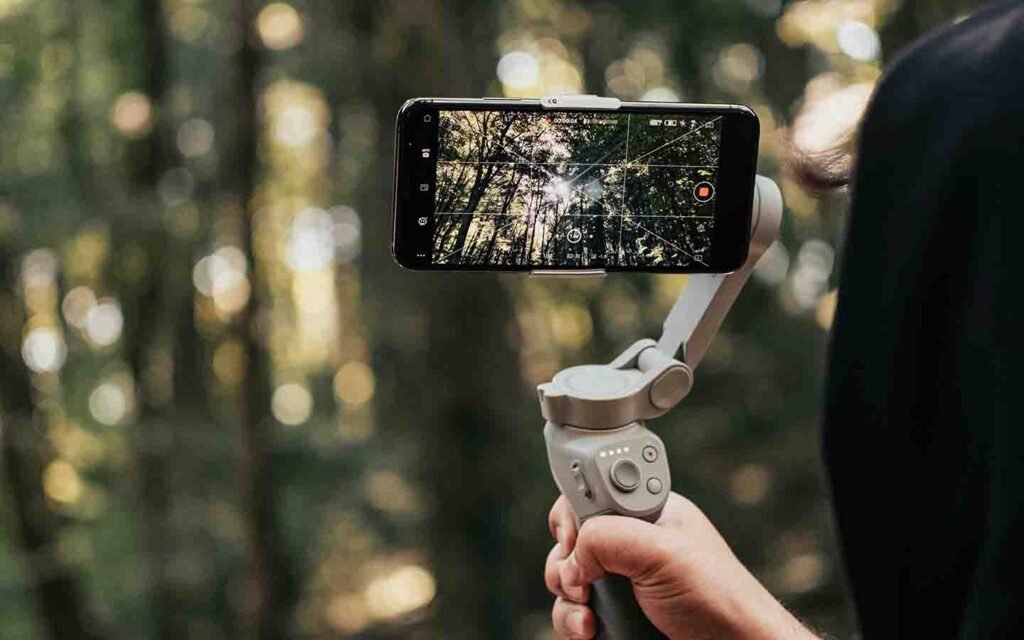
Shaky footage can easily turn off viewers. A small tripod or stabilizer can work wonders, but if you’re working without one, don’t worry—you can still stabilize your shots manually. Holding your phone with both hands and keeping your arms close to your body will do the trick.
Pro Tip: Turn on your phone’s image stabilization feature (if available), and if you can, try using your environment (like resting your phone on a stable surface) to help steady your shot.
Frame Like a Pro
Framing is one of the simplest ways to make your videos look more professional. Use the rule of thirds, which you can enable by turning on grid lines in your camera settings, to position your subject for maximum impact. Avoid centering everything—shift your subject slightly to the left or right for a more dynamic shot.
Pro Tip: I dive deeper into the rule of thirds and framing in a video on my YouTube channel. You can watch it here for more insight into how proper framing can enhance your video.
Prioritize Clear Audio
Video might grab the attention, but audio is what keeps your viewers engaged. Your phone’s built-in mic is okay for casual recordings, but if you want more professional sound, consider investing in an external mic. A small lavaliere mic or a shotgun mic will instantly improve your sound quality.
Pro Tip: Audio is just as important as video quality, if not more. Even a $20 clip-on mic can make a huge difference when it comes to recording dialogue or interviews.
Clean That Lens (Seriously!)
It may seem basic, but cleaning your camera lens is an often-overlooked step. A smudged or dirty lens will result in blurry footage. Give it a quick wipe with a microfiber cloth (or even your T-shirt if you’re in a pinch) before every shoot.
Pro Tip: A clean lens ensures your footage is crisp and clear—don’t skip this easy step!
Edit Like a Boss
After filming, your next step is to edit your footage into something cohesive and engaging. You don’t need expensive software—apps like CapCut and iMovie have everything you need to trim clips, add transitions, and even adjust color settings.
Pro Tip: Take your time with editing, and don’t forget to enhance the brightness or contrast as needed. A little tweaking can take your footage from good to great.
Conclusion
Smartphones are powerful tools for shooting high-quality videos. With the right techniques—good lighting, proper framing, stable shots, and clear audio—your smartphone videos can look every bit as professional as those shot on more expensive equipment. And if you want to take it a step further, don’t forget to check out my YouTube videos on lighting and framing for some extra guidance.
Ready to shoot? Grab your phone, use these tips, and create videos that truly shine!
2 thoughts on “Say Goodbye to Basic: Create Professional Smartphone Videos Like a Pro”